
Architecture overview
Alexandria is built around one shared Rust core. Every tool reads and writes the same file-first workspace: Markdown notes with YAML frontmatter, date-based note storage, media files, and trash. Tag membership is derived from note frontmatter into a SQLite index rather than stored as on-disk links.
Diagram
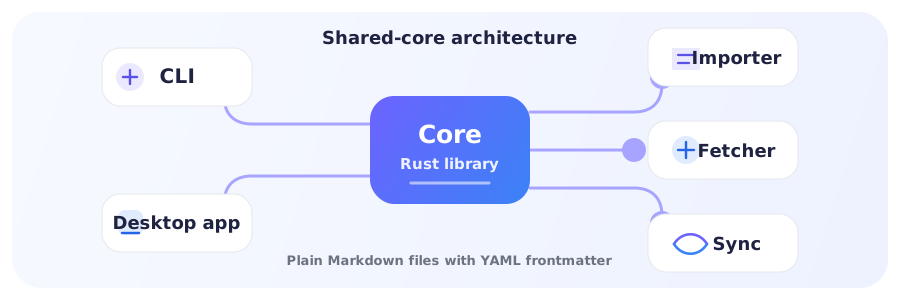
Shared components
Core library
alexandria-core is the shared Rust engine for storage, tags, properties, media, trash, search, workspace setup, and file formats.
CLI
akb provides terminal workflows for creating, tagging, searching, media management, and sync. It is built from the core crate.
Desktop app
alexandria-tauri pairs a React/TypeScript frontend with a thin Tauri command layer over the Rust core.
Importer
akb-importer imports Notion exports into the same Markdown workspace used by the CLI and desktop app.
Web fetcher
akb ingest article captures web articles as Alexandria notes in the local workspace, pictures and all.
Sync
alexandria-sync, akb sync, and akb-sync-server provide end-to-end encrypted cross-device sync with a zero-knowledge server.
How they fit together
- The core owns the file format and local operations.
- The CLI, desktop backend, importer, and fetcher call the core for local work.
- The sync client and server move encrypted workspace data between devices.
This shared-core design keeps behavior consistent while preserving portable, human-readable files.
Why this design
- Reliability: one core keeps behavior aligned across interfaces.
- Simplicity: each tool has a clear responsibility.
- Portability: files are easy to inspect, back up, move, version, or sync.